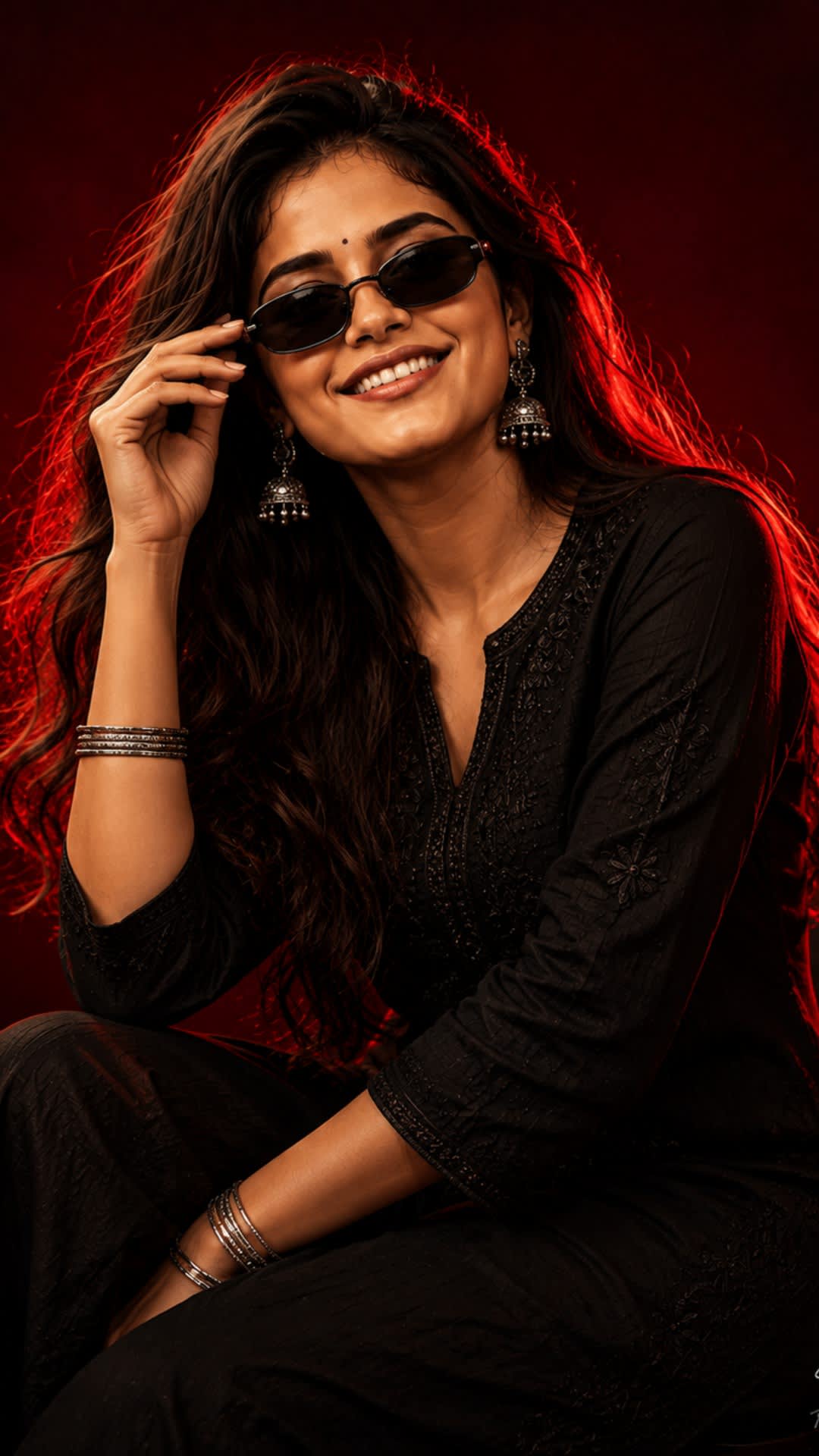
Cinematic Indian Gen-Z Luxury Portrait
by Haseeb Gujjar
Full prompt
Use the uploaded character reference image as the ONLY identity reference. Preserve exact recognizable facial identity, facial structure, natural skin tone, hairstyle, hair texture, eyes, nose, lips, jawline and natural proportions. Create an ultra-realistic cinematic Indian Gen-Z luxury portrait with the SAME dark crimson-red studio aesthetic. OUTFIT: Modern premium black straight-cut kurti with subtle tonal embroidery and a refined textured fabric. Pair with minimal silver bangles and elegant oxidized-silver earrings. Contemporary Indian Gen-Z styling. SUNGLASSES: Narrow vintage-inspired oval black sunglasses with dark lenses and a sleek glossy frame. POSE: Seated relaxed editorial pose on a minimal dark studio stool. One elbow resting casually on the knee, one hand lightly touching the sunglasses. Head tilted slightly toward camera with a subtle confident smile. HAIR: Long straight-to-soft-wavy dark hair falling naturally around the shoulders and back. LIGHTING: Strong crimson-red rim lighting from behind, glowing red hair outline, soft warm face illumination, controlled shadows and dramatic cinematic contrast. BACKGROUND: Deep burgundy-to-crimson seamless gradient with a subtle red glow directly behind the character. CAMERA: 85mm professional portrait photography, shallow depth of field, realistic bokeh, detailed skin, hair and fabric, premium studio photography, sophisticated cinematic color grading. COMPOSITION: Vertical 4:5. Medium-to-three-quarter portrait, character occupying approximately 75% of frame. BRANDING: Small elegant handwritten artist signature reading exactly “Explore AI Tech” at the bottom-right. NEGATIVE: No identity alteration, no facial reshaping, no excessive beauty filter, no plastic skin, no cartoon/anime, no CGI, no distorted hands, no extra fingers, no sunglasses deformation, no logos, no additional text.
Replace bracketed placeholders (e.g. [SUBJECT]) with your own words before pasting into your AI tool.
Variations
Example outputs and the exact prompts used to create them.
This template uses a single main prompt without variation examples.
How to use this prompt
- 1
Upload the reference character image to define identity
- 2
Specify outfit, jewelry, and styling details
- 3
Set lighting style and background color
- 4
Choose Vertical (1080 × 1920) (e.g., 4:5) and camera lens
- 5
Generate the portrait using the prompt
- 6
Review and refine the output for accuracy and quality
Variables guide
[CHARACTER_REFERENCE_IMAGE]
The uploaded photo that provides the exact facial identity, hairstyle, and proportions
e.g. clear selfie, high-resolution portrait
[OUTFIT_DESCRIPTION]
Detailed description of clothing, accessories, and styling
e.g. Modern premium black straight-cut kurti with subtle tonal embroidery, minimal silver bangles and oxidized-silver earrings
[LIGHTING_STYLE]
Description of lighting setup and color scheme
e.g. Strong crimson-red rim lighting from behind with soft warm face illumination
[ASPECT_RATIO]
Desired output aspect ratio for the final image
e.g. 4:5 (Portrait), 1:1 (Square)
Pro tips
- •Use a high‑resolution, well‑lit reference image to preserve natural skin tone and facial structure
- •Avoid excessive beauty filters or plastic skin effects to maintain realism
- •Match the described lighting and color grading to achieve the cinematic red‑crimson aesthetic
- •Keep the composition vertical 4:5 with the subject occupying ~75% of the frame